
Defense Pricing, Contracting, and Acquisition Policy
May 2026
Version 2.0
An HTML guidebook
Four sections
Market Research Guide
Published by the Office of the Under Secretary of War for Acquisition and Sustainment. Section 4, Using Artificial Intelligence (AI) in Market Research, is the part this piece reads.
The short version
- 1AI is now part of how the Department researches your market. Of the ten tasks the guide says AI can help with, the ones that decide whether you are in the market are identifying potential contractors, synthesizing RFI responses, and identifying NAICS codes and contract vehicles.
- 2Five tools are named, and they do different work. GenAI.mil drafts and synthesizes, Advana draws on data from over 400 business systems, and TurboInnovate can retrieve direct contacts for nontraditional contractors.
- 3Your RFI response may reach a decision maker as a model's summary. The guide's model prompts tell the AI to add nothing to the responses it is given and to note a gap rather than fill it, so what your response leaves out stays out.
- 4Your registration is the reference. The guide lists sixteen kinds of AI hallucination, and five of them are about the contractor. For three of those it sends the buyer to SAM.gov or USAspending.gov; for the other two it names no system at all.
- 5The decisions stay human, and AI use leaves a record. The contracting officer makes every determination, and the guide wants a log of the tools, prompts and outputs, kept with audits and protests in mind.
01What the guide now asks buyers to do with AI
Market research is how a buying office learns what the market can deliver before it writes a requirement and chooses how to buy it. FAR Part 10 requires it, and the guide's first section calls it a continuous activity, "not a one-time compliance requirement". It is where a buyer decides whether a commercial item can meet the need, which contract vehicle to use, and whether the work is set aside or justified as a sole source. Those decisions are made before a solicitation is posted, which is why market research matters to a contractor as much as to the buyer.
Section 1 sets four guiding principles: Early and Continuous Engagement, Commercial First Mindset, Data-Driven Decisions and Broad Industry Engagement. Each one shapes your chance to be counted. Research starts early: "Start research before requirements are finalized", so the window to shape a requirement opens before it is written. It is commercial first, so teams must first ask whether commercial products or services can meet the need, under FAR Part 12. It reaches wide, to traditional defense contractors, non-traditional vendors, startups and small businesses, and academia and research institutions. And it rests on "verifiable market insight rather than assumptions", the same standard Section 4 holds a model's output to.
Of the guide's four sections, the second sets out a lifecycle for doing market research and the third a long list of government resources and tools. The fourth, Using Artificial Intelligence (AI) in Market Research, is the Department's instruction to its buyers on using AI, and it is the one this piece reads.
Section 4 has six parts: where AI helps, the tools, how to write a prompt, hallucinations, drafting the Market Research Report with AI, and governance. It opens with the tasks AI can assist contracting and program personnel with:
- Drafting the Market Research Report
- Synthesizing RFI responses and industry day inputs
- Identifying potential contractors
- Mapping requirements to commercial solutions
- Exploring acquisition pathways
- Identifying applicable commercial solutions and emerging technologies
- Interpreting FAR and Defense FAR Supplement (DFARS) requirements
- Identifying relevant NAICS codes
- Identifying existing contract vehicles
- Summarizing historical procurement data extracted from authoritative systems
Market Research Guide, paragraph 4.1
"AI is an assistive tool, not an authoritative source"
The guide adds that AI can augment the market research methods FAR Part 10 requires but cannot replace them, and that it may summarize regulatory text but cannot give a legal interpretation or a policy determination.
For a contractor the list is the point. Identifying potential contractors, mapping a requirement to commercial solutions and naming the NAICS codes and contract vehicles are the steps that decide whether your company is in the market a requirement is written for. The guide now expects a model to take a first pass at each, and it says "AI outputs must be cross-checked against authoritative sources".
02The tools that will read about you
Market research runs from public information to procurement-sensitive Controlled Unclassified Information, so the guide fences the work in: "Personnel must ensure they operate within DoW-approved AI environments". It then names five tools.
The DoW-authorized AI tools the guide names
1 of 5
GenAI.mil
From the guide's description
- "synthesizing RFI responses, organizing vendor information"
They do different work. GenAI.mil is the Department's drafting platform, and the guide expects it to help synthesize RFI responses, organize vendor information and draft parts of the Market Research Report. AskSage is described for reading the FAR and DFARS and analyzing clauses. Advana is the Department's data environment, drawing on over 400 business systems to find historical prices, assess contract vehicles and map what vendors can do, and the guide is careful to say it is not a conversational chatbot. Enterprise Pro for Government runs live internet searches and writes cited summaries; the approved version may process CUI and does not train on what it is given. TurboInnovate searches for technologies, vendors and nontraditional contractors, and can retrieve direct contacts for them.
The difference that matters to you is where each tool gets its facts. The guide warns that most standalone models "cannot actively search internal DoW systems or real-time procurement databases", so the team has to paste in the verified data it wants analyzed. What reaches a drafting prompt about your company is what the team gave it: your RFI response, your capability statement, the results of a search. The enterprise platforms that query live data read the federal record about you instead. Either way, what the tool reads about you is something you wrote or a record about you that you can check.
03Your RFI response, summarized by a model
Section 4 teaches buyers to build a prompt from four descriptions: the requirement, the market context, the output wanted and the constraints. Each comes with a weak prompt and a strong one, and the strong ones show how a response like yours is likely to be handled.
The strong example for the output asks the AI to turn RFI response summaries into a Contractor Capabilities Assessment for the Market Research Report, with a table of each contractor's experience, certifications and capability gaps, and it ends: "Do not add any contractor information beyond what is contained in the summaries I have provided". The guide's steps for drafting the report say the same about the team's own notes: give the AI validated research and confirmed capabilities, and "Do not ask AI to generate this data".
The constraints the guide tells buyers to put in their prompts protect you as well. There are five of them. One tells the AI not to invent contractor names, CAGE codes or socioeconomic status; another reads "Do not recommend a specific vendor or imply competitive preference". A related example tells it not to rank or score contractors against each other and, where a capability is unclear, to say so instead of assuming.
Read together, these mean the summary a decision maker sees is built only from what you wrote, by a model told to add nothing and to flag a gap rather than fill it. A capability you implied but did not state, a vehicle you hold but did not name, a certification you expected the buyer to look up: each is a gap the model is told to note, not a fact it will supply. That is our reading, not the guide's. Write the response so that a faithful summary of it still carries your NAICS codes, your contract vehicles with their numbers, your certifications as SAM.gov and the SBA show them, and comparable federal work by contract number.
04The record the AI is checked against
A hallucination, in the guide's words, is plausible but incorrect information, and Section 4 lists sixteen kinds, from invented FAR clauses to fabricated regulatory deadlines. Then it puts the burden on the buyer: "Acquisition teams remain fully responsible for the factual accuracy of their market research".
To check, the guide names four systems, each with what it is for:
- SAM.gov
- vendor status, CAGE codes, socioeconomic categories
- USASpending.gov
- contract numbers, award values
- Acquisition.gov
- FAR/DFARS text
- GAO.gov
- GAO bid protest decisions
It adds that "AI can assist, but verification must be human-led".
Each kind of hallucination, and where the guide says to check
10 of 16 matched to a system
Five of the kinds are about the contractor itself. The guide's list sends a buyer to SAM.gov for nonexistent contractors or CAGE codes and incorrect socioeconomic status, and to USAspending.gov for fabricated past performance data. For false vendor capabilities and incorrect NAICS or product & service code (PSC) assignments it names no system at all, which leaves the buyer with what you submitted and what your registration says.
The warning signs point the same way. One of the six the guide lists is a vendor claim the AI cannot back with names: it says many vendors offer a capability but "cannot name three specific, verifiable companies with existing federal contracts". Another is a contract vehicle presented as current that expired or was recompeted years ago.
Put plainly, the reference a buyer's AI is held to is your registration and your award record. A lapsed registration, a CAGE code that does not match, a socioeconomic status you no longer hold or a NAICS code you do not use is a discrepancy the buyer has to resolve before the guide lets them rely on anything the AI said about you. Check what the record says before a buyer's AI does.
Look at your own record first
Enter your UEI to open your company page in GovConDash: the SAM.gov registration with its status, expiration date, CAGE code and NAICS codes, your SBA certifications, and your recent prime awards as USAspending reports them.
No account yet? Start your 14-day free trial of Pro, then come back. Without a UEI, the Partner Finder lists companies by NAICS code and agency, and each row opens the same page.
05The decisions stay with the contracting officer
Section 4 closes with the controls the guide expects whenever AI touches market research.
The guide's controls on AI in market research
5 controls
Market Research Guide, paragraph 4.6
"Never delegate a determination to an AI tool"
The determinations the guide names are set-aside decisions, sole-source justifications and price reasonableness. AI can inform them; the contracting officer makes them.
The second control is the one counsel will read first: "To facilitate audits and protests, document which AI tools were used, which prompts were run, what outputs were generated, and how those outputs were validated". The guide adds that a simple log saves time in a protest discovery or an Inspector General inspection. If a set-aside decision or a sole-source justification on a requirement you care about rests on market research, the guide now expects a record of which AI tools were used, what they were asked and how their answers were checked.
Two more controls protect you directly. The first covers the proprietary information in your RFI response: "Only paste CUI, proprietary vendor information, or acquisition-sensitive data into Government AI tools that are explicitly approved for such data". The second is a caution about time: "The same prompt may produce different outputs over time as AI models are updated", so the guide tells teams to re-validate an older prompt's output on a newer model.
The last control is the plainest: "If an AI output feels too smooth, too specific, or too convenient, it may be hallucinated", and the answer the guide gives is a manual check against authoritative systems.
06Where GovConDash fits
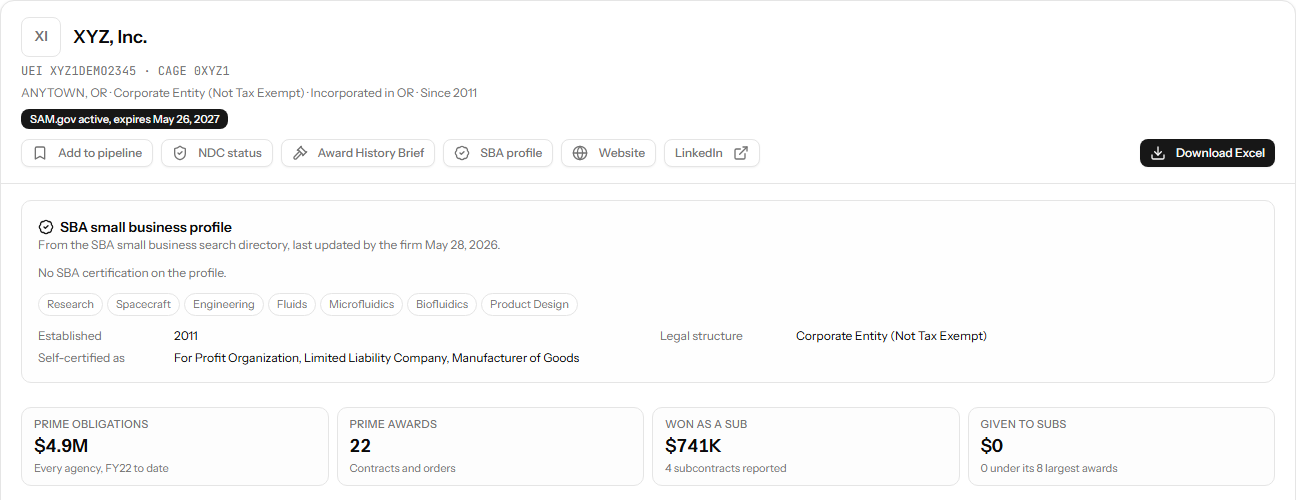
The guide's checks for a contractor run through public records: the SAM.gov registration and the award history on USAspending.gov. GovConDash reads both. Its company page puts one company's registration, certifications and prime awards on one screen, which is the view of you a careful buyer reaches after the AI has had its say.
Teaming / Partner Finder
Your company, as the record shows it
The company page reads the registration from the SAM.gov public extract and the prime awards from USAspending.gov: status and expiration, CAGE code, the NAICS codes you registered, SBA certifications, and the agencies and codes behind your awards. Open your own with your UEI above, or find companies by NAICS code and agency in the Partner Finder.
Documents and data used in this piece
The guide
- Market Research Guide, Version 2.0, May 2026
The guide this piece reads, an HTML guidebook on the Defense Pricing, Contracting, and Acquisition Policy site, published by the Office of the Under Secretary of War for Acquisition and Sustainment, as captured on October 25, 2026. Section 4 is the part on AI.
- The DoW-authorized AI tools the guide names
Section 4.2, AI Tools for Market Research, whose table names each tool and what it is for: GenAI.mil, AskSage, Advana, Enterprise Pro for Government, TurboInnovate.
Regulations
- FAR Part 10, Market Research, in the FAR Overhaul part deviation guide
The part the guide says AI can augment but cannot replace. The guide links the Revolutionary FAR Overhaul text on Acquisition.gov.
- DFARS Part 210, Market Research, class deviation 2026-O0021
The Department's own market research part under the FAR Overhaul, as the guide links it.
The systems the guide says to check
- SAM.gov
For vendor status, CAGE codes, socioeconomic categories, in the guide's words.
- USAspending.gov
For contract numbers, award values, in the guide's words.
This piece is commentary on published Department guidance. It is not legal advice. Where it says what a part of the guide means for you, that is its own reading, not the Department's, and so is the matching of each kind of hallucination to a system.

GovConDash.ai
Know what the record says before a buyer's AI does
Start a 14-day free trial of Pro and open the full dashboard: your registration, certifications and prime awards on one page from SAM.gov and USAspending.gov, with the rest of GovConDash beside them. Checkout takes a card and charges nothing for 14 days. Cancel before then and you pay nothing; keep going and it becomes $99 / month. One trial per account.
Keep reading
The Pentagon Put AI on Every Computer. Your DCAA Auditor Is on It Too.GenAI.mil from the auditor's side: what DCAA has published about using generative AI on incurred cost audits, and what a contractor can put on its own side of the table.