
Ask your existing customers what is still unfunded
Year-end money moves toward relationships that already exist, so the single highest value list you own is the list of agencies and contracting offices that have already awarded to you. A program manager sitting on an unfunded priority is far more likely to route it through a company already on contract than to start a new procurement this late in the year.
Four questions are worth asking every customer you have, this week: are there unfunded requirements that could move before September 30, are option years or task orders under consideration, is additional funding expected on current work, and did anything get deferred earlier in the year that could now be revived. None of these require a solicitation to exist.
How much rides on the answer depends on who the customer is. Over the window, Department of State put 53.3% of its year into the fourth quarter, while Department of Energy put 17.7% there, so the same September is a closing window at one and an ordinary month at the other. The figure for every department in the window is in the companion piece, and the customer worth calling first is the one whose year is about to end.
The Opportunities tab matches open federal solicitations against your company’s own federal award history and labels why each one matched. Two of those match reasons are exactly this discipline: an Existing customer chip when the notice comes from a sub-agency that has awarded to you before, and an Existing office chip when it comes from the specific contracting office that has. Each chip carries your own award count and dollars with that buyer, so it is evidence rather than an assertion.
The office-level match is derived from the contract numbers in your own award history rather than a lookup table, which is why it can name a specific issuing office instead of stopping at the department. On a free account the same matches, with the same reason text, arrive in the weekly digest described under item 4 rather than on the tab.
Track the smaller actions, not just new awards
New award announcements get the attention, but modifications, added line items, incremental funding, exercised options, and increased task order ceilings are where a large share of fourth-quarter activity actually happens. They move faster because they take less procurement effort, and they are invisible if the only thing you watch is a solicitation feed.
This is measurable, not folklore. Over the window, orders placed on vehicles that already exist, meaning delivery orders and BPA calls, put 38.1% of their dollars into the fourth quarter, against 29.8% for standalone contracts and purchase orders. The spike runs disproportionately through instruments a contractor already holds, which is the arithmetic behind putting this item second rather than fourth.
The practical version of this discipline is knowing, without looking anything up, which of your contracts have an option decision or a period of performance ending inside the next ninety days. Those are the conversations with a deadline attached.
The Contracts tab keeps a lifecycle monitor over your active portfolio, sorted by expiration urgency, with counts of what expires inside thirty and ninety days. The timeline reads the period of performance from the award record itself, including the potential end date when the record carries one. The Home page groups the same awards by end date, thirty days or less, thirty-one to ninety, ninety-one to a year, and beyond, per awarding agency, so the customers to call this month are visible before you open the tab.
Where the underlying award data does not state a potential end date, the timeline says so rather than estimating an option year. A guessed date is worse than a blank one when you are deciding which customer to call.
Know a solicitation's requirements before you need to
Year-end solicitations arrive with compressed response windows. A notice posted in September with a two-week turnaround is not the moment to discover that the requirement is spread across forty attachments, that the submission instructions are buried in a file named something unhelpful, or that a pricing template needs data you do not have assembled.
Reading order matters more than reading volume. The documents that carry requirements are rarely the first ones listed, and the ones that look substantial are often an acronym list.

The Opportunity Requirements Package workflow takes a single SAM.gov notice and builds the requirement documents a response is assembled from. It pulls the notice’s published attachments, ranks them by what they are likely to contain rather than the order they happen to be listed in, reads what fits the budget, and states plainly which files it read and which it skipped.
It also adapts to what the notice actually is. A sources sought notice or a request for information gets a market research package rather than a compliance matrix it has no requirements to fill, and when such a notice carries no readable attachment the run says the requirement lives in the notice description it cannot fetch and asks for it, rather than guessing at a scope.
Be in the conversation before the notice posts
The contractors who do well at year-end are the ones who were already in the conversation. That is less about frequency of contact than about noticing quickly: knowing within days, not weeks, that a customer of yours posted something, that a deadline is approaching, or that a requirement in your lane went up for comment.
The failure mode is not laziness. It is that checking a solicitation feed properly is a weekly chore that quietly stops happening in a busy quarter, which is precisely the quarter it matters in.
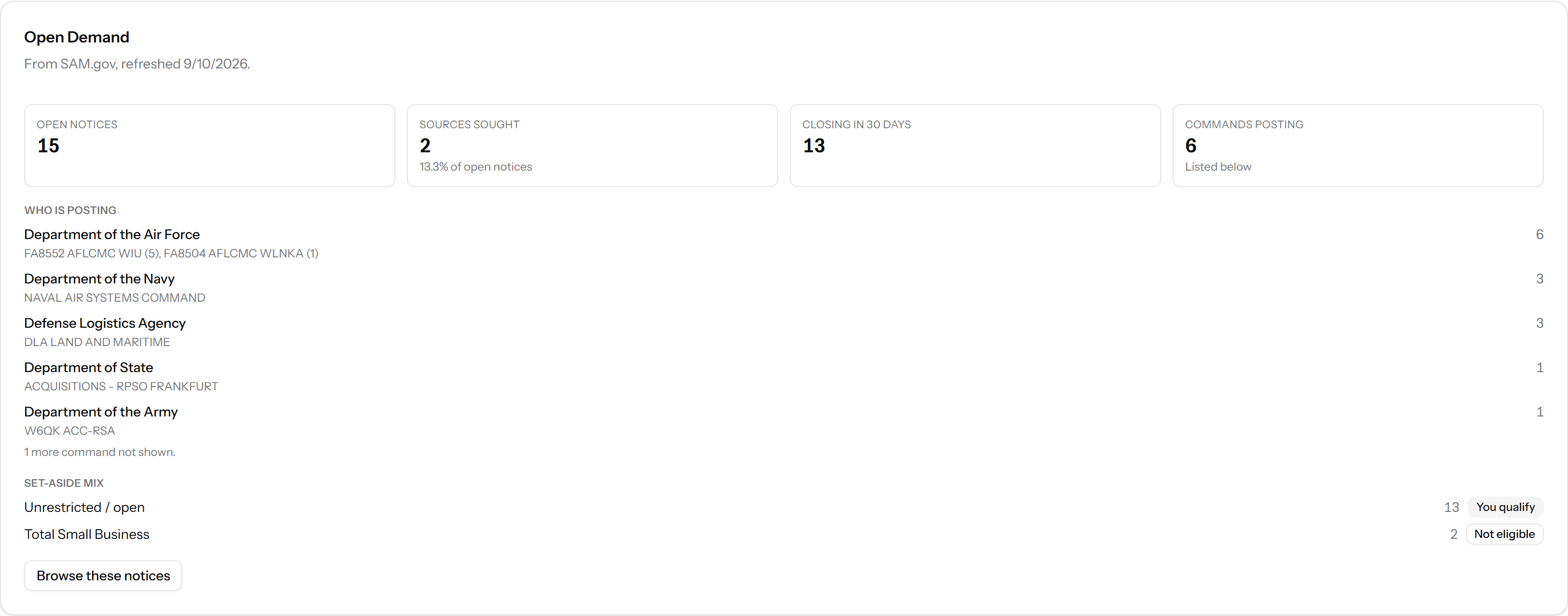
The weekly digest email leads with the opportunities matched to your company, in the same order the dashboard ranks them and with the same reason text on each, alongside the regulatory changes you are watching and, for a small business, the DoW SBIR/STTR topics that fit. It exists so the weekly check happens even in the week you do not log in.
It is strictly opt-in. Nothing is sent unless you turn it on in account settings, and a week with nothing to report sends nothing at all.
Get your pricing and rate posture defensible now
Plenty of capable companies miss fourth-quarter work for an unglamorous reason: they cannot produce a defensible price fast enough. When a contracting officer asks for pricing on Tuesday for a Friday deadline, the constraint is rarely capability. It is that labor rates, indirect rate projections, and approval paths live in different places and disagree with each other.
The other half of this is knowing what kind of exposure your portfolio actually carries. Whether you sit mostly on firm fixed price work or mostly on cost reimbursement decides how much FAR Part 31 allowability and incurred cost audit scope applies to you, and that answer should not be a guess.
The Contract Mix card on the Contracts tab reads your portfolio for the two senses of contract type that matter, the pricing arrangement that drives FAR Part 31 and Part 42 exposure and the award vehicle, and reports the share of your work that is flexibly priced. The figures are reported over the share of contracts that actually state the field rather than assuming the rest match, so a sparse field reads as missing data and never as a portfolio without cost-type work.

Ledger Scan screens an uploaded general ledger against a FAR 31.205 unallowable term catalog that is generated from the regulation text and checked against it, and returns the transactions worth a second look with the matched term and its criteria attached to each one. Uploading and previewing a ledger and browsing the term catalog are on every account; the screen itself, and the analysis and workpapers drafted from what it finds, are Pro and Max.
It is deliberately modest about what it claims. A keyword screen surfaces candidates for review and says so on its own upload screen, and nothing it flags is a determination.
Know who else is standing in the lane
When time is short, agencies lean toward the choice they can defend. Past performance, a realistic schedule, and clear pricing carry more weight in a compressed award than they do in a leisurely one. Knowing who else has been winning the work you are chasing tells you whether you are the safe choice in that lane or the one asking a contracting officer to take a risk in their busiest month.
Worth being precise about what is knowable here. No public source publishes who is bidding an open solicitation. What is public is who has won similar work before, which is a strong signal and a different thing.
For each of your top matched notices, the Market Intelligence view builds a lane: who has won work under that NAICS and product or service code from that buyer, drawn live from federal spending data over a stated window, with your own position in the lane stated at the foot of the table and the incumbent named when the notice’s award record names one. Where the notice is a set-aside, the lane limits the winners to companies that have won under that set-aside when the data allows it. When it cannot, the panel labels the list as unrestricted rather than presenting every past winner as an eligible competitor.
It states its limit on the page rather than in a footnote. A lane reports who has won that work, which is an inference about likely competition, never a list of bidders on any open solicitation.
The checklist
Six items. The first two can still move work before the books close on September 30. The rest decide the next fourth quarter.
- Ask your existing customers what is still unfunded
- Track the smaller actions, not just new awards
- Know a solicitation's requirements before you need to
- Be in the conversation before the notice posts
- Get your pricing and rate posture defensible now
- Know who else is standing in the lane
About the figures. USAspending.gov, prime contract award types A, B, C, D, FY2021 through FY2025 (2020-10-01 through 2025-09-30). FY2026 is in progress and is excluded. Q4 carries 34.6% of obligations over the window, which is 1.59x an ordinary quarter, and September carries 17.6% of the year on its own. The orders-versus-standalone split and the department figures are the same module’s. The full analysis, including how much the concentration varies by department, is in the companion data piece.
About the screenshots and the plan labels. Product images on this page are captured from a live account and show real data. Counts and dates in them were current when captured and are illustrative of the view, not a live feed. Each product note names the plan it needs, read off the pricing table: where it says Pro and Max, the surface is not on a free account.

GovConDash.ai
See where you stand before the books close
Create a free account and you get the contracts lifecycle monitor, the contract mix, the opportunity insights and, if you opt in, a weekly email of the solicitations matched to your company. Browsing those matches on the dashboard, the market brief and the requirements workflow are Pro and Max features.