- Explore the whole platform
Find and win work
- OpportunitiesSAM.gov notices and DoW SBIR/STTR topics, matched to your NAICS codes and set-asides.
- AgenciesFind the departments, commands and offices buying what you sell, and who wins there.
- TeamingFind partners by code, size and award record, and the role you can play beside each.
- Contracts and VehiclesYour award portfolio, plus the GWACs, multiple-award IDIQs and GSA schedules and who holds them.GSA MAS
- Other TransactionsOT agreements, the consortia that award them, and the prototype OT guide.
- NDC StatusCheck nontraditional defense contractor status under 10 U.S.C. 3014.
- NAICSFind your code, its SBA size standard and the market under it: who buys it and who wins it.
Stay compliant
- Audit ReadinessDCAA audit programs, the Contract Audit Manual and selected costs under FAR 31.205.
- Incurred Cost ProposalBuild Schedules A to O, model indirect rates and roll forward each fiscal year.
- Pre-Award SurveyPrepare your accounting system for DCAA's pre-award survey.
- CAS Disclosure StatementDetermine whether you must file, then prepare Form CASB DS-1 on the official form.
- Subcontracting and Flow-DownThe FAR clause library, the flow-down matrix and a clause scan of your documents.
- CMMCThe C3PAO directory and the CMMC enforcement record.
- Accounting ToolsScan a ledger for unallowable costs and map a chart of accounts.
Research and case law
- Regulations and PolicyFAR, DFARS and CAS with a research agent that cites every section it uses.
- Federal Budget and NDAADoW budget lines and NDAA bill text, read against your NAICS codes.
- SEC Filings10-K, 10-Q and 8-K analysis for the public companies you compete and team with.
- GAO ProtestsBid protest decisions, searchable in full text, with outcome insights.
- ASBCABoard decisions on contract disputes and cost allowability.
- Courts and BoardsCourt of Federal Claims, Federal Circuit, CBCA and SBA OHA decisions.
- False Claims ActJustice Department False Claims Act releases on federal procurement, with enforcement insights.
- Law FirmsThe counsel who appear before the six tribunals, and the cases they argued.
Agents and integrations
- Dashboard AgentAsk one question across the regulations, DCAA guidance, the case law and your own company, and open every source it cites.
- WorkflowsMulti-step drafts, from a DCAA audit response to a GAO protest, each with its sources cited.
- MCP serverBring the same grounded data into Claude, ChatGPT and the other assistants that connect over MCP.











- Word, Excel and OneDriveExport drafts to Word and Excel, and keep your Workspace in sync with OneDrive.


- See the data coverage
Regulations and policy
Contracts and spending
Audit and compliance
- Security
- Pricing
















Get registered.Get your Unique Entity ID.
Before a company can bid on a federal contract as a prime, it registers in SAM.gov, the official U.S. government system for contracting. Registration assigns your Unique Entity ID (UEI), the identifier the federal government knows your entity by.
This page walks through what SAM.gov asks for, in the order it asks, and links every step to SAM.gov and the Federal Service Desk, which remain the authority.
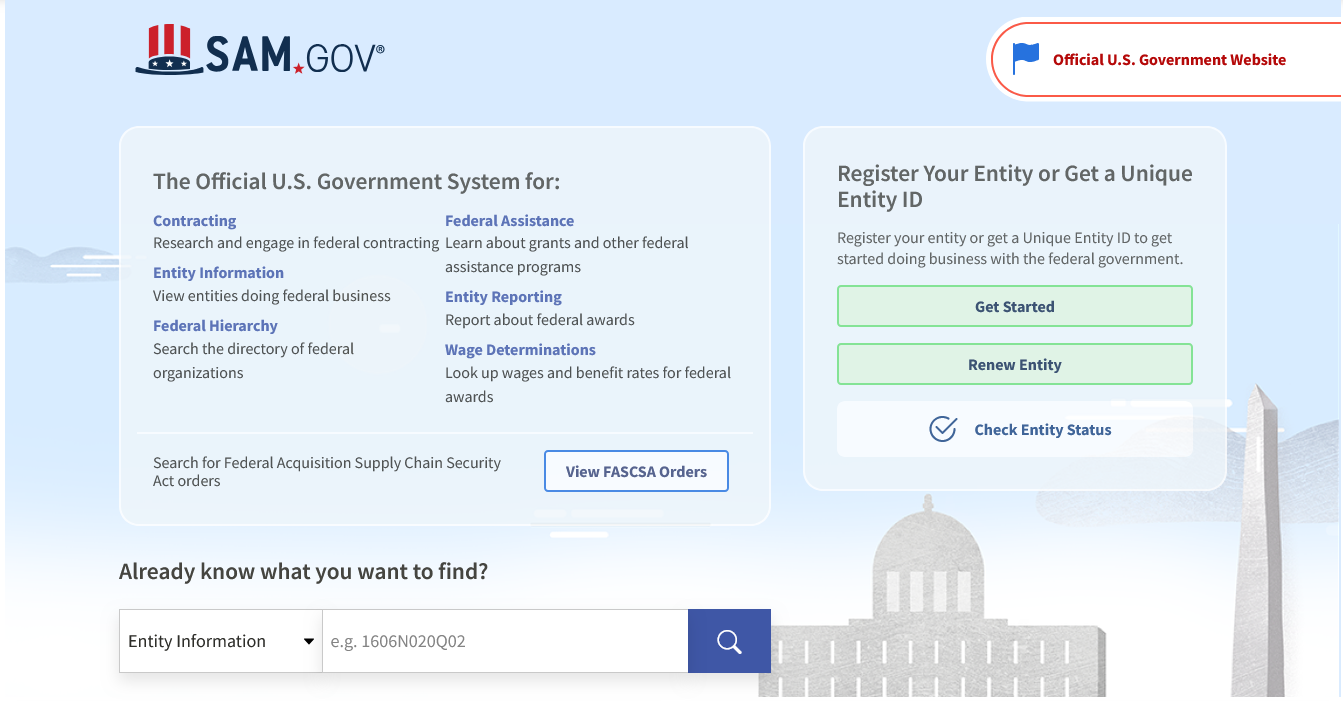
The SAM.gov home page
Full registration, or a UEI only
Register your entity
- Required to apply for federal awards as a prime awardee, including bidding on government contracts.
- Requires detailed information about your entity, from its tax ID and bank account to its NAICS codes and points of contact. See What to gather, below.
- Assigns your Unique Entity ID as part of the registration.
- Must be renewed every 365 days to stay active.
Get a Unique Entity ID only
- For entities that only do certain transactions, such as reporting as a sub-awardee.
- Needs only your legal business name and physical address.
- Does not let you apply directly for federal awards. To bid as a prime, complete the full registration.
- If you are already registered, you already have a Unique Entity ID.
Source: SAM.gov Entity Registration.
What to gather
01
To get the Unique Entity ID
- Legal business name
- Physical address (a post office box may not be used)
- Date and state of incorporation
SAM.gov validates your name and address. If it cannot, open a help ticket with the Federal Service Desk from that page.
02
Core Data
- Organization start date and fiscal year end date
- Mailing address, and optionally a website and division
- Taxpayer Identification Number (TIN) and IRS consent (U.S. entities)
- CAGE code, if you have one (one is assigned after you submit if not)
- Owner and predecessor details, if another entity owns you or you succeeded one with a federal contract or grant in the last three years
- Entity structure, profit structure and socioeconomic categories
- Bank account for electronic funds transfer: account type, routing and account numbers, and a remittance address
Some entities also answer executive compensation and proceedings questions; the checklist sets out when.
03
Assertions
- NAICS codes for the goods and services you provide, and optionally PSC codes
- Size metrics: annual receipts and number of employees
- Whether to join the Disaster Response Registry, with bonding levels if you need them
04
Reps and Certs, and POCs
- The FAR and DFARS representations and certifications, answered in SAM.gov
- Mandatory points of contact: Accounts Receivable, Electronic Business and Government Business, each with name, email and phone
- Optional points of contact, such as Past Performance
- If you are a small business, the SBA supplemental page
 is free. In its own words, there is no charge to get a Unique Entity ID, register your entity, and maintain your entity registration at SAM.gov.
Source: SAM.gov Entity Registration Checklist, the All Awards registration.
Four steps to register
01
Learn about registration
Decide whether you need a full registration or only a Unique Entity ID. If you will bid on contracts as a prime, you need the full registration.
02
Set up a SAM.gov account
Sign in to through Login.gov, which manages your username and password, then complete your profile.
03
Prepare your data
A full registration asks for detailed information about your entity; work from the Entity Registration Checklist (PDF). A Unique Entity ID alone needs only your legal business name and physical address.
04
Get started
On the SAM.gov home page select Get Started, then choose Register Entity or Get a Unique Entity ID, and work through the sections.
The sections of a full registration
Core Data
Your entity's basic business information.
Assertions
Not required if you register for federal assistance opportunities only.
Representations and Certifications
The representations and certifications you make to the government.
Points of Contact
The required POCs, plus optional POCs you may add or remove.
Sources: SAM.gov Entity Registration and Federal Service Desk KB0016307.
GSA's walkthrough
Update or renew your registration
- 01Sign in to SAM.gov and go to your Workspace.
- 02Find the Entities widget. Select the number above your registration's status (active, work in progress, submitted), or the widget's title to see all of your registrations.
- 03Find the entity record you want to update and select Update.
- 04Say whether you are an employee or officer of the entity, then select Next.
- 05When asked what you would like to update, choose to update or renew your entire entity registration.
- 06Confirm your purpose of registration: Financial Assistance Only or All Awards. The questionnaire only suggests an answer; if its suggestion does not fit, choose the other option (KB0058181).
- 07Validate your legal business name and physical address. SAM.gov searches the entity validation service for a match (KB0060385); if needed, submit documentation and restart the update (KB0058402).
- 08Review and update each section: Core Data, Assertions, Representations and Certifications, and Points of Contact.
- 09If you qualify as a small business, update your information in SBA's Dynamic Small Business Search, or apply for a small business certification through SBA.
- 10Review the whole registration and select Submit on the Entity Review page. You will see a confirmation and receive a confirmation email.
Source: Federal Service Desk KB0016307, How do I update/renew an existing entity registration in SAM.gov?
After you submit
IRS and CAGE checks
A submitted registration goes through IRS taxpayer identification number checks and CAGE verification where they apply (KB0016540, KB0016994).
No changes while in review
Once you submit, you cannot make further changes until the submitted registration has completed its reviews.
Submitted for 15 business days?
Compare your Workspace with the Check Entity Status button on the SAM.gov home page (KB0016313). If both show submitted, call CAGE at 877-352-2255. If they disagree, contact the Federal Service Desk.
24 to 48 hours more
After the registration is active in SAM.gov, it can take another 24 to 48 hours to reach other government systems.
Where to get help
APEX Accelerators
Based in the United States and pursuing a federal contract? Find an APEX Accelerator near you at apexaccelerators.us.
Federal Service Desk
GSA's help desk for SAM.gov, with knowledge articles on every registration question, at fsd.gov.
Grants.gov Support Center
Applying for or managing grants? See the Grants.gov Support Center.
Put your UEI to work
SAM.gov registration,
answered.
What a Unique Entity ID is, what you need before you start, how often you renew and where to get help.
The identifier SAM.gov assigns to an entity doing business with the federal government. A full entity registration includes one, and an entity that only needs to do certain transactions, such as reporting as a sub-awardee, can get a Unique Entity ID without registering.
No. SAM.gov states that registration is required to apply for federal awards as a prime awardee. A Unique Entity ID on its own does not let you apply directly for federal awards.
A SAM.gov account, signed in through Login.gov. For a full registration, the information on SAM.gov's Entity Registration Checklist: your TIN, bank account for payments, NAICS codes, size figures and points of contact among it. For a Unique Entity ID only, your legal business name and physical address.
No. SAM.gov's checklist states that there is no charge to get a Unique Entity ID, register your entity, and maintain your entity registration at SAM.gov.
Every 365 days, to keep the registration active. You can also update it at any time, through the same Update flow in your SAM.gov Workspace.
SAM.gov's registration page states no fixed time. A submitted registration goes through IRS and CAGE checks, and the Federal Service Desk advises contacting CAGE if it shows submitted for 15 business days or longer. Once active, it can take another 24 to 48 hours to reach other government systems.
In the United States, an APEX Accelerator helps businesses pursue federal contracts; find one near you at apexaccelerators.us. The Federal Service Desk (fsd.gov) answers SAM.gov questions, and the Grants.gov Support Center helps with grants.
Once you have one, enter it during company setup. GovConDash reads your SAM.gov registration and your USAspending award record under that UEI, so your NAICS codes, opportunities, contracts and size status start from the record rather than from typing.

About this page
- GovConDash is not affiliated with SAM.gov, the General Services Administration or the Federal Service Desk. SAM.gov is the official system; register only at sam.gov.
- The steps are restated from SAM.gov's Entity Registration page and Federal Service Desk article KB0016307 as of November 6, 2026. SAM.gov changes its screens and rules; where this page and SAM.gov differ, follow SAM.gov.
- The screenshot is of the public SAM.gov home page, and the video is GSA's own, played from YouTube. Both are shown only to help you find your way.
- Nothing on this page is legal or accounting advice.